Archive for Jan 23 2009

Investigating JavaScript Array Iteration Performance

The other day I was working on some JavaScript code that needed to iterate over huge arrays. I was using jQuery's $.each function just because it was simple, but I had heard from a bunch of articles on the web that $.each was much slower than a normal for loop. That certainly made sense, and switching to a normal for loop sped up my code quite a bit in the sections that dealt with large arrays.

I'd also recently seen an article on Ajaxian about a new library, Underscore.js that claimed to include, among other nice Ruby-style functional building blocks, an each function that was powered by the JavaScript 1.5 Array.forEach when it was available (and degrading for IE). I wondered how much faster that was than jQuery's $.each, and that got me to thinking about all the different ways to iterate over an array in JavaScript, so I decided to test them out and compare them in different browsers.

This gets pretty long so the rest is after the jump.

JSONView 0.4 with content negotiation

JSONView 0.4 was just approved on addons.mozilla.org. This one is mostly a bugfix release from 0.3, but I couldn't let it go out without one new feature, so I finally added support for content negotation. This means that you can go to the new JSONView options dialog (in the Addons menu) and enable sending the “application/json” content type with your HTTP Accept header. Some applications (like some Ruby on Rails websites) are set up to return JSON if you ask for it via the HTTP Accept header, and XML or HTML otherwise. This means thay you can now specify a preference for JSON, which should help when you're in that situation. I specifically made sure it works with CouchDB, which is an exiting document-based database with a JSON API. Before this option, CouchDB would return plain text to browsers, but now you can make it send JSON that'll be nicely formatted by JSONView. Note that the option to modify the HTTP Accept header isn't on by default because many people won't need it, and it has the potential to screw up some websites that don't expect browsers to ask for JSON. That said, I'm sure this will be helpful in a bunch of situations.

JSONView Options

On the bugfix side, I fixed the issue I mentioned in my post about JSONView 0.3 where values that were 0 or false wouldn't show up at all as a result of some overzealous error-checking. I also hunted down an infuriating bug where JSON documents would sometimes report as invalid when Firebug was on. This took a while to track down, but apparently Firebug slows down the loading of the document enough to mess with how I was reading a stream (and I had to be careful not to re-trigger an earlier bug that could cause Firefox on OSX to crash.) Anyway, it's fixed now, and everybody should see more reliable document rendering, Firebug or not. For those living on the edge, JSONView is also marked as compatible up to Firefox 3.7a1pre, so you should have no trouble installing it on Minefield or the upcoming Firefox 3.6 alpha.

One thing that might stand out is that the new options dialog might not be localized for your language. JSONView's localizations are handled by the generous volunteers at Babelzilla, which is great for me, but not as great when I want to rush out a release with important bugfixes. In this case I chose to ship 0.4 before all the new localizations had arrived, but I'll add them all in again for the next release once the translators have caught up.

So grab JSONView 0.4 from addons.mozilla.org, or just update your extensions if you've already got it installed. As usual, feel free to send me feedback as comments on this post, and file bugs and feature requests at Google Code.

Swoopo Profits Greasemonkey Script - Entertainment Shopping

In the last few weeks I've become increasingly obsessed with the evil genius that is Swoopo.com. Swoopo is a penny-auction site - users buy bids for $0.60, and each bid placed on an item increases the price by $0.12. The cost of bids and the amount they increase the price of the item vary depending on the type of auction and the country you're in. Swoopo does a lot to make it harder to win, though. For example, if the bid is placed within 10 seconds of the end of an auction, the closing time of the auction is extended by 10 seconds or so, so people can have last-second-sniping wars for as long as they want. They also offer a “BidButler” service that will automatically bid for you, and of course if two users in an auction are using it, the BidButlers just fight until they've used up all the money they were given. Swoopo's operation is like cold fusion for money - they make insane amounts of cash off their users, and they only have to drop-ship the item to one user so there's theoretically very little operating cost (they already have the money from selling bids, and they don't need to maintain inventory). They're shameless enough to even have auctions for cash, gold, and even more bids! Because everyone in the auction is paying to participate, even if the winner gets some savings on the item, Swoopo makes far, far more on the sunk bids - sometimes 10x the price of the item in pure profit.

Jeff Atwood (of codinghorror.com) has written about Swoopo multiple times, and some techies have even tried to game the system, but it hasn't worked. I was introduced to Swoopo through Jeff's blog but I hadn't thought about it forever, and for some reason it came up again recently. After looking at it a bit, I was just floored by how they've managed to set up such a perfect money-generating system. The company that runs Swoopo is called “Entertainment Shopping”, which I guess is supposed to be a suggestion that it's like gambling (where it's “fun” to lose money) though they really, really don't want to be regulated as gambling. I don't personally find gambling (or bidding on Swoopo) to be that fun, but I do find it entertaining to watch the astronomical profits tick up as more and more suckers toss money into an auction. So I built a little Greasemonkey script that'll add the estimated profit to Swoopo above the price of an auction, updating in real time as people place bids.

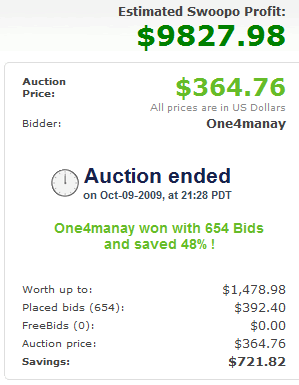
Example screenshot of Swoopo Profits

It took quite a bit of work to sniff out the prices from the page (I suspect they make it hard to scrape on purpose), but I've checked it out and the script works pretty well on current and recent auctions on all of Swoopo's different sites (US, Canada, UK, Germany, Austria, and Spain). It won't work on some of their older auctions, where the rules were slightly different (and bid costs were different, too). The basic formula looks like this:

((currentPrice - bidAmount) / bidAmount) * bidCost + currentPrice - worthUpTo

I'm calculating it with all the fairness to Swoopo I can muster. I calculate the number of bids based on the current price and the amount each bid moves the price (bidAmount) times the cost of bids (bidCost). The winner still has to pay the current price, so I add that in, but I subtract what Swoopo says the item is “worth up to” since they probably have to pay around that to drop-ship it to a customer. As the example screenshot shows, this leads to examples like an iMac selling for $364.75 (plus another $392.40 in bids for the winner), but a total pure profit of $9,827.98 for Swoopo. Exciting! I'll readily admit that my calculation is not always 100% accurate. There are a number of things I don't take into account - I assume shipping is a wash, so it's not included. I assume Swoopo's paying the full retail “worth up to” price when they're probably not. I count bids as all costing the same even though they might have been won at a “discount” via a bid auction. In cases where I can't figure out some numbers I default them to hardcoded values, which might be wrong. I also don't take into account “Swoop it now”, which lets bidders buy the item for its full price minus the money they've sunk into bids, effectively getting out of the auction entirely. This would reduce Swoopo's profits but it isn't recorded anywhere so I can't factor it in. So take the number with a grain of salt - it's entertainment.

Grab the script and start poking around swoopo.com. Hopefully you'll have as much fun as I have with it.

As a side note about my Greasemonkey scripts, I've retired the “Amazon Super Saver Snooper” script. Amazon has changed the way the API used to look up Super Saver eligability works, and I can't get at that data anymore. More importantly, Amazon now puts “Prime” logos next to Prime-shippable items, so the script isn't necessary anymore.

Updates to JSONView, XBList, and TopProcess

I've finally gotten around to doing some maintenance updates on three of my most-used bits of software (JSONView, XBList, and TopProcess), all in the last couple weeks. Now that they're all approved and live, I thought I'd summarize what's changed.

JSONView 0.3

JSONView 0.3 is now available at addons.mozilla.org. This fixes an error that was showing up when really large JSON files were being displayed, and adds a feature that displays empty arrays and object on one line instead of on two (and doesn't display the expand/collapse button for them). I also put in some preliminary support for JSONP, based on a patch submitted by Gabriel Barros. The catch is that it only works with content served with the “application/json” MIME type, which is actually not the correct MIME type for JSONP - it should be “text/javascript” or another JavaScript type. Unfortunately I haven't been able to figure out how to get Firefox to let me handle “text/javascript” the way I do with “application/json” - it seems to be special-cased or something. If any Firefox gurus are reading and know a solution, please let me know! I was holding onto this release for a while hoping to fix that, but I decided that releasing something was better than nothing, so it's out there and you can play with it. You can see an example JSONP response with the callback highlighted here. I did notice a bug with the 0.3 release right after it was approved - if a value is 0 or false, it shows up as blank. I'll have that bug fixed with the next release, which should be very soon. It's great to see that JSONView has become so popular, with over 50,000 downloads and about 12,000 regular users.

XBList 3.2.4

Halo 3: ODST was released a couple weeks ago, and Bungie redesigned their site a bit to include ODST info in your Service Record. This included changing the pages just enough that XBList got confused trying to figure out emblems for people who had never played Halo, and started showing the wrong emblems for those people (only if you prefer Halo emblems to Xbox emblems, which isn't the default). Not a huge bug, but I took the opportunity to clean up a bunch of stuff in XBList and put out a little release. In addition to the Halo emblem fix, I fixed a bug where your settings could get corrupted and you wouldn't be able to start XBList. I also cleaned up the menus and settings, consolidating the Halo links into one item, and removing the option to choose a custom notification sound or turn off debug logging. The debug log is much easier to get to if you're having trouble - previously I had people dig through their Application Data folders for the log, but now there's an item in the Help menu that opens the debug log directly. Paired with some much more detailed logging, I should be able to fix future problems much more easily. I also changed the system tray icon to bring XBList to the front on a single click rather than a double click, since that feels much more natural in Windows 7. Lastly (and probably not too importantly for most people), I'm storing emblems in your local Windows profile now, instead of the roaming profile. For the few people who use XBList and have roaming profiles enabled, this should save you some sync time. Anyway, you should have been prompted to update when I pushed the update two weeks ago, but if you haven't gotten it yet you should download and install it now. I still have plans for a major overhaul of XBList, but it's low on my list of priorities - XBList is still pretty popular, but not as much as it used to be, with maybe 5,000 active users.

TopProcess 1.4

This last update has been a long time coming. Ever since I installed Internet Explorer 8, the TopProcess sidebar gadget has been randomly crashing. I'm not sure what changed in Internet Explorer to make it screw up every so often, but it does. However, it only crashes after running for a few days, so for months I've been tweaking the code a bit, then waiting until it crashes, then tweaking some more, rinse, repeat. I've finally nailed it down to the point where crashes are very rare, and then I added some code that automatically resets the gadget when it crashes. So you should never see it mess up again. There is also a gadget log file in the gadget's install directory that I'm using to store errors, so it should be easier to troubleshoot in the future. Lastly, Jean-Pierre van Riel contributed a patch that added IO tracking to TopProcess, so there is now a third way to view your processes. This view shows you the total IO usage (combined bytes in and out, per second) which seems to cover both disk and network access. Get the update from me or from Windows Live Gallery and be sure to rate the gadget. I'm excited to see that it's been downloaded over 100,000 times from WLG (plus who knows how many downloads from my site).

XBList updated to 3.2.2 to deal with Xbox.com changes

I've just uploaded a new version of XBList that fixes it after the new Xbox.com site changed everything around. Oh, the joys of writing a screen-scraping app! There's some good news though - the new Xbox.com design actually puts much more info on the friends page, so XBList needs to do a lot less work to get all its info, which means less resource usage and less network traffic.

I've still got a partial rewrite of XBList sitting on a back burner that should fix the intermittent crashes some people have been reporting, as well as drop the “sign in with Internet Explorer” requirement and generally make logging in more reliable. However, I've got a lot of other projects going, and XBList doesn't crash for me, so it might be a while until it's out. Until then, enjoy XBList 3.2.2 and the new Xbox.com!

Update: I was a bit too hasty, and 3.2.2 had a bug that prevented it from loading your Xbox Live messages. I've uploaded 3.2.3 that fixes that.

JSONView 0.2 adds support for opening local .json files

Just a quick update on JSONView - I've submitted version 0.2 to addons.mozilla.org. This new version doesn't have a lot of changes, but it adds some new translations (Hungarian, Bulgarian, German, and some Turkish), and you can now open “.json” files saved on your computer, enabling offline JSON viewing. This new version is also compatible with the latest Firefox 3.5 betas.

Of course, the extension must be reviewed before this new version can be released from the sandbox, but if you want to try it out you can download version 0.2 from the sandbox. Hopefully it'll be approved soon and will show up on the main extension listing. Please give it a look and rate and review the extension on addons.mozilla.org.

I'll be out of the US on vacation until next month, but after that I intend to do some more work on the feature backlog for JSONView, as well some updates to other projects. Remember you can vote on features or file new ones at the Google Code issue tracker for JSONView.

JSONView Updated to 0.1b3

Today I uploaded a new version of JSONView to addons.mozilla.org. I'm sticking with the wimpy version number for now, but I think JSONView has been proving itself out in the wild. One major bug was uncovered that caused JSON documents larger than 8KB to render incorrectly, and that's fixed in this new version. I've also added three new translations of the extension (French, Dutch, and Czech) courtesy of the folks at BabelZilla.org - if you want to help out you can check out the available translations and add yours. Lastly, the extension is now compatible with Firefox 3.1b3. I've been trying to keep things tested on the beta browsers within a day or two of their release. If you have an older version of the extension you'll need to go back to AMO and install it again - automatic updates won't work until JSONView is out of the sandbox.

JSONView has gotten a bit of coverage on the blogs, too, which I've enjoyed. It made it onto the front page of Delicious and reddit programming, and Ars Technica wrote an article in their journals. Also, I was interviewed on OpenSource Release Feed, which was fun. I'm glad that people are getting to use the extension and find it helpful. Hopefully when it gets released from the sandbox it'll get even broader exposure.

JSONView - View JSON documents in Firefox

I'm a big fan of JSON as a data exchange format. It's simple, lightweight, easy to produce and easy to consume. However, JSON hasn't quite caught up to XML in terms of tool support. For example, if you try to visit a URL that produces JSON (using the official “application/json” MIME type), Firefox will prompt you to download the file. If you try the same thing with an XML document, it'll display a nice formatted result with collapsible sections. I've always wanted a Firefox extension that would give JSON the same treatment that comes built-in for XML, and after searching for it for a while I just gave up and wrote my own. The JSONView extension (install) will parse a JSON document and display something prettier, with syntax highlighting, collapsible arrays and objects, and nice readable formatting. In the case that your JSON isn't really JSON (JSONView is pretty strict) it'll display an error but still show you the text of your document. If you want to see the original text at any time, it's still available in “View Source” too.

JSONView logo

I've been eager to release this for some time, but I finally pushed it to addons.mozilla.org last night. I actually started development on it about 7 months ago, but work got paused on it for about 6 months due to stuff out of my control, and then I had some other projects I was working on. The actual development only took a few days (including digging through some confusing Unicode bugs). I thought it was funny that right as I was resuming work on JSONView I noticed that a JSON explorer had actually landed for Firebug 1.4, which I'll also be looking forward to. Initially I had intended to build that functionality as part of my extension. There's a lot I'd like to add on, like JSONP support and a preference to send the “application/json” MIME type in Firefox's accept headers.

This is actually my first real open source project - I've released some code under open source licenses before, but this is actually set up at Google Code with an issue tracker and public source control and everything. I've licensed it under the MIT license. I'm really hoping people get interested in improving the extension with me. I've pre-seeded the issue tracker with some known bugs and feature requests.

The extension itself is pretty simple. I wasn't sure how to approach the problem of supporting a new content type for Firefox, so I followed the example of the wmlbrowser extension and implemented a custom nsIStreamConverter. What this means is that I created a new component that tells Firefox “I know how to translate documents of type application/json into HTML”. And that it does - parsing the JSON using the new native JSON support in Firefox 3 (for speed and security) and then constructing an HTML document that it passes along the chain. This seems to work pretty well, though there are some problems - some parts of Firefox forget the original type of the document and treat it as HTML, so “View Page Info” reports “text/html” instead of “application/json”, “Save as…” saves the generated HTML, Firebug sees the generated HTML, etc. Just recently I came across the nsIURLContentListener interface, which might offer a better way of implementing JSONView, but I'm honestly not sure - the Mozilla documentation is pretty sparse and it was hard enough to get as far as I did. I'm hoping some Mozilla gurus can give me some pointers now that it's out in the open.

Right now the extension is versioned at “0.1b1” which is a wimpy way of saying “this is a first release and it could use some work”. It's also trapped in the “sandbox” at addons.mozilla.org, where it will stay until it gets some downloads and reviews. Please check it out, write a little review, and soon people won't have to log in to install it!

Note: While composing this post I ran across the JSONovich extension which was apparently released in mid-December and seems to do similar stuff to JSONView. No reason we can't have two competing extensions, though.

Fallout 3 licensed soundtrack with Amazon MP3 links

I just finished Fallout 3 last night. Yeah, that's one of the reasons I haven't released anything new in a while. One of my favorite parts of the game was the old music they used. I loved the BioShock soundtrack too. Now that I'm done with the game and won't be listening to Galaxy News Radio anymore, I figured I'd hunt down the individual songs on Amazon MP3 so I can listen to them while I'm playing other games (my favorite is when Halo or Chrono Trigger music plays over another game). As long as I'm doing that, I thought I'd post the links for everyone else, since I didn't find a list with links to download the songs anywhere online. I got the list itself from Wikipedia's Fallout 3 page. Unfortunately not all of the songs are available - hopefully they'll show up in time.

  1. I Don’t Want To Set The World On Fire” - The Ink Spots
  2. Way Back Home” - Bob Crosby & the Bobcats
  3. Butcher Pete (Part 1)” - Roy Brown
  4. Happy Times” (From the Danny Kaye film The Inspector General) - Bob Crosby & the Bobcats
  5. Civilization (Bongo, Bongo, Bongo)” - Danny Kaye with The Andrews Sisters
  6. Into Each Life Some Rain Must Fall” - Ella Fitzgerald with The Ink Spots
  7. Anything Goes” - Cole Porter
  8. “Fox Boogie” - Gerhard Trede
  9. “I’m Tickled Pink” - Jack Shaindlin
  10. “Jazzy Interlude” - Billy Munn
  11. “Jolly Days” - Gerhard Trede
  12. “Let’s Go Sunning” - Jack Shaindlin
  13. A Wonderful Guy” - Tex Beneke
  14. “Rhythm for You” - Eddy Christiani & Frans Poptie
  15. “Swing Doors” - Allan Gray
  16. Maybe” (Intro song from the original Fallout) - The Ink Spots
  17. Mighty Mighty Man” - Roy Brown
  18. Crazy He Calls Me” - Billie Holiday
  19. Easy Living” - Billie Holiday
  20. “Boogie Man” - Sid Phillips

Update: Amazon added the right version of “Butcher Pete” and I've linked it above.

Middle mouse button on a ThinkPad

File this under small victories, I guess. A couple months ago my trusty old ThinkPad R51 decided to cook itself to death, so I went ahead and got a shiny new ThinkPad T500. It's quite an upgrade, but I missed one feature from my old machine. ThinkPads have this weird hybrid pointing device called a TrackPoint which consists of a trackpad and two buttons, then a nubbin-pointer and three buttons for that. On my old ThinkPad I could use the nubbin's center button as a middle-click, which is great for opening links in new tabs, closing tabs, Unix-style copy/paste, etc.

t500

I didn't even use the nubbin, I just used its button. However, on my new ThinkPad, the center button switched the nubbin to scrolling mode, and turning that off in the driver just made the button do nothing! However, I recently stumbled upon the solution. If you completely uninstall the UltraNav driver, the middle button becomes a normal middle mouse button again, and the nubbin and trackpad still work. Tab management is easy again!

Visual Studio debugger is too sensitive about exceptions

I was working on XBList the other day when I hit a peculiarity of Visual Studio. I wanted to call a method asynchronously, so I was using BeginInvoke with a callback, as described in this article on MSDN. So I used BeginInvoke to fire off a method, and the method I invoked happened to throw an exception. I didn't expect this to be a big deal - when the callback was called, I would call EndInvoke which would re-throw the exception and I could deal with it. However, while running in Visual Studio's debugger, I got a break and an error dialog that claimed I had an unhandled exception. My code never made it to EndInvoke. It said something like “Exception unhandled by user code”.

It turns out that this is just some weirdness in Visual Studio. If you go to the Debug menu, choose “Exceptions…”, and uncheck “User-unhandled” for Common Language Runtime Exceptions, the exception will get properly thrown when EndInvoke is called, and everything's fine.

exceptions-setting

It's annoying that I have to give up the relatively useful unhandled-exception trapping that the Visual Studio debugger gives me, but I guess there's no other way around it.

Apple text emboss

Back in the days of OS X 10.1 I wasn't a really big fan of the striped backgrounds, overblown transparency, and over-the-top animations Apple was using to show off their new desktop. However, in the last few releases they've tightened up the look of their OS, made it much more consistent, and have ended up with a really nice design that I find very inspiring. The OS X aesthetic has of course translated over to the iPhone, where it's even more elegant.

One of the little touches that I really like is that label-style text on a gradient or colored background has a slight emboss effect that really makes it pop off the background and gives everything a nice 3D physicality without being too overt. You can see examples on the iPhone, in button and header text as well as the icons on the top bar:

iPhone button emboss

I fiddled around in Fireworks for a while trying to replicate the effect, but I couldn't quite get it right until I asked a friend at work, who quickly pointed out that it's really just a simple drop shadow, not any sort of emboss effect. I guess my eye had seen a more complex effect than what what actually there. Anyway, it's pretty simple: you add a drop shadow with no fuzz, 50% opacity. If you have light text, you add a black shadow that is cast straight up, and if you have dark text, a white shadow that's cast straight down. That's all there is to it!

shadow

I went ahead and applied this effect to the “BRH.numbera.com” text on the top of my site, and I really like the way it makes the text pop off of the background.

Now that I knew how to do it, I decided that the low-contrast menu text on my site could also benefit from such an effect, but I wasn't going to go and replace every bit of text in the menu with images. So instead, I used a CSS3 property that's supported in Safari 3, Opera 9.5, and the upcoming Firefox 3.1: text-shadow. I'd already used text-shadow to put some soft drop shadows on the links across the top of my site and the section header, so it wasn't too hard to add them to the links. All that was required is:

text-shadow: 0 1px 0 #C9DFF3;

So that says to make a shadow straight down (0px right, 1px down), 0 fuzz, and the color #C9DFF3. I had to pick that color because text-shadow doesn't have an opacity property built in. Of course, using another CSS3 feature, HSLA colors, I can make a shadow that works on any background:

text-shadow: 0 1px 0 rgba(255, 255, 255, .5);

And for light-colored text:

text-shadow: 0 -1px 0 rgba(0, 0, 0, .5);

I ended up keeping the hand-chosen background color in addition to the HSLA version since Opera supports text-shadow but not HSLA. So now I have a cute little enhancement to my site that users of cutting-edge browsers will get to enjoy.

Comparison of Apple Text in different browsers

Note that Google Chrome, despite being based on the same WebKit core as Safari, doesn't support text-shadow since Google had to provide their own rendering layer (Apple uses their own proprietary renderer).