Windows Sidebar Gadgets
Windows Sidebar is the gadget platform in Windows Vista and Windows 7. It allows you to install small, specialized mini-apps that are always on your desktop.
Gadgets
-
TopProcess - This simple Sidebar gadget
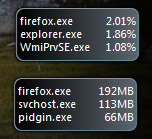
shows the top processes on your system - the processes that are consuming the most CPU, Memory (Working Set), or IO (Bytes Written/Read). By default it shows the top three processes by CPU, but it can be configured
to show more or less. Check out an example
screenshot.
Please rate this at Windows
Live Gallery. Available in English, Italian, Japanese, and Russian. (Blog posts)
-
Xbox Live Gamercard - This very
simple Sidebar gadget just shows an Xbox Live Gamercard. When docked, it scales to fit
in the sidebar, and when undocked, it's full size (except in Windows 7, where docking doesn't make sense). Please rate this at Windows
Live Gallery. (Blog Post)
-
Bungie Card - This
gadget displays a Bungie Card that has your Halo 3 stats in it. It has options for displaying two views of your stats, and allows you to double-click to
go directly to your Halo 3 stats. It also supports a shrunk-down view when it's docked, and you can click on it to get a quick view of your expanded stats. Check out an example
screenshot. Please rate this at Windows
Live Gallery. (Blog Post)
-
360Voice.com Challenges
- This gadget keeps you up to date on your 360Voice.com challenges.
360Voice challenges let you compete with your friends to see how many Xbox 360 achievement points you can gain
in a set period of time. The sidebar gadget shows the current standings, the time left, and the amount of gamerscore
that has been earned during the day that hasn't been tallied into the standings yet. Also, when the challenge is over,
it displays the results until your next challenge starts. Check out an example
screenshot. Please rate this at Windows
Live Gallery.